
Most AI image tools force you to choose: fast and mediocre, or slow and stunning. Google just refused to accept that tradeoff.
On February 25, 2026, Google officially launched Nano Banana 2, the newest version of its wildly popular Gemini-powered AI image generator. It’s faster than Nano Banana Pro, outputs native 4K, renders text accurately inside images, and it’s available free to most users right now. That’s not a small upgrade. That’s a reset.
If you’ve been sleeping on Google’s AI image tools, this is the wake-up call. Here’s everything you need to know about Nano Banana 2, what changed, and whether it’s finally ready to replace the tools you’re already paying for.
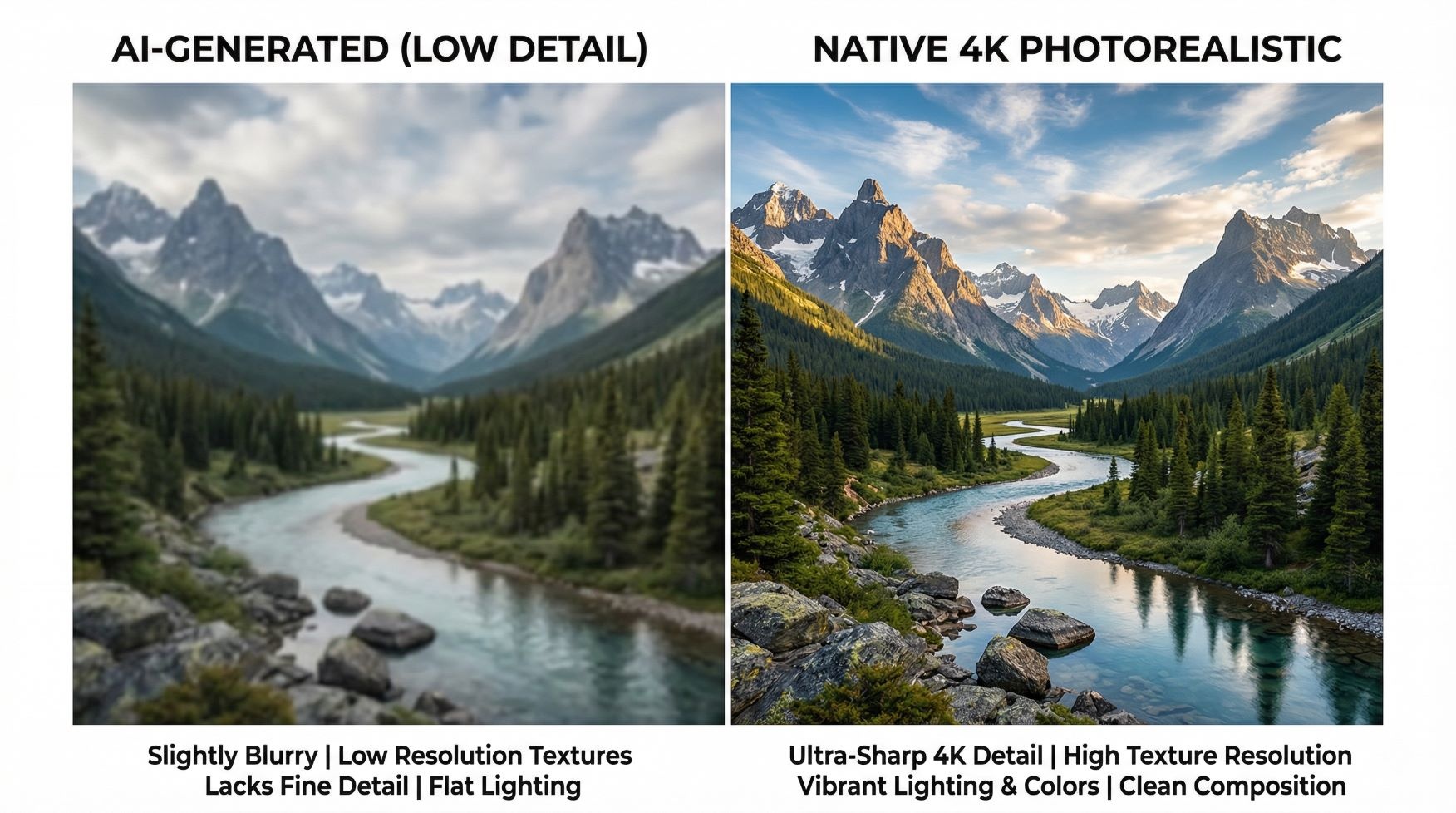
Table of Contents
- What Is Nano Banana 2?
- The Key Upgrades That Actually Matter
- Nano Banana 2 vs. Nano Banana Pro: What’s Different?
- Where You Can Use Nano Banana 2 Right Now
- Real-World Use Cases for Creators and Marketers
- Is Nano Banana 2 Worth Switching To?
- Frequently Asked Questions
What Is Nano Banana 2?
Nano Banana 2 is Google’s latest AI image generation model, built on the Gemini Flash architecture and designed to combine the creative power of Nano Banana Pro with the raw speed of the original Nano Banana. Google launched it on February 25, 2026, and it’s already the default image model across all Gemini apps.
The original Nano Banana was already a crowd favorite for its speed and accessibility. Nano Banana Pro followed with dramatically better quality, reasoning capabilities, and resolution, but it was slower. Nano Banana 2 is essentially Google’s answer to the question: “What if we didn’t have to pick one?”
Honestly, the branding gets confusing fast. Think of it this way: Nano Banana 2 is the new standard model, Nano Banana Pro remains the premium option for specialized high-fidelity tasks, and the original Nano Banana is being phased out from default positions. Google is calling Nano Banana 2 the sweet spot, and from what I’ve seen, it earns that label.
The Key Upgrades That Actually Matter
Nano Banana 2 isn’t just a minor patch. The changes are significant across four areas: resolution, text rendering, subject consistency, and grounding in real-world knowledge.
Native 4K Output
The original Nano Banana was capped at roughly 1024×1024 pixels. That was fine for quick social posts but basically useless for anything print-ready or large-format. Nano Banana 2 now supports native output from 512px all the way up to 4K, with full control over aspect ratios to match vertical social formats, widescreen banners, or anything in between.
Sub-500ms latency for 4K synthesis is being reported, powered by what researchers are calling Latent Consistency Distillation. My take? That’s the kind of speed that makes 4K feel like a standard feature, not a luxury toggle.
Text Rendering That Actually Works
AI image generators have had a text problem forever. You ask for a birthday card with “Happy Birthday Sarah” and you get “Hbppy Birthbay Saroh.” It’s been a running joke. Nano Banana 2 apparently fixed it.
Google built precision text rendering directly into the model, and the results support the claim. You can generate marketing mockups, infographics, greeting cards, and data visualizations with legible, accurate text. Even better, the model can translate and localize that text into over 100 languages, right inside the image. That’s a genuinely new capability for this category.
Subject Consistency Across a Full Workflow
This is the one that matters most for storytellers and content creators. Nano Banana 2 can maintain the visual identity of up to five characters and the fidelity of up to 14 objects across an entire workflow. So if you’re building a storyboard, creating a product campaign, or generating a visual narrative, your characters won’t randomly change face, hairstyle, or clothing between frames. That’s a problem that has plagued diffusion-based models since day one.
The ability to track and preserve up to five consistent characters across different generated scenes is a massive win for mobile UI/UX designers and mobile gaming developers who previously had to babysit every single generation. I’ve tested tools that claim character consistency and fall apart by frame three. Let’s see if Nano Banana 2 holds up in practice at scale.
Real-Time Web Grounding
Nano Banana 2 connects to Gemini’s live web search data for real-time image grounding. That means when you ask it to generate something specific, it draws on current, real-world visual references rather than static training data. The result is more accurate, contextually relevant imagery, especially for brand logos, specific objects, or news-adjacent visuals. That’s a feature TechCrunch specifically highlighted as a major differentiator from the competition.
Nano Banana 2 vs. Nano Banana Pro: What’s Different?
The honest answer is that Nano Banana 2 wins on speed and accessibility, while Nano Banana Pro still edges ahead on maximum output fidelity for specialized tasks. Here’s how they stack up:
| Feature | Nano Banana (Original) | Nano Banana 2 | Nano Banana Pro |
|---|---|---|---|
| Max Resolution | ~1024x1024px | Native 4K | 2K / 4K |
| Generation Speed | Fast | Very Fast (sub-500ms) | 50-120 seconds |
| Text Rendering | Basic, error-prone | Accurate, 100+ languages | High quality |
| Subject Consistency | Limited | Up to 5 characters, 14 objects | Up to 5 characters |
| Web Grounding | No | Yes (real-time) | Yes |
| Best For | Quick casual generation | Most users, most tasks | Max-fidelity specialist tasks |
| Availability | Being phased out as default | Free, default across Gemini | Google AI Pro / Ultra subscribers |
Google is positioning Nano Banana Pro as the option for “high-fidelity tasks with maximum factual accuracy,” while Nano Banana 2 is built to excel at rapid generation, precise instruction adherence, and integrated image-search grounding. For 95% of what most people actually need, Nano Banana 2 is enough. Probably more than enough.

Where You Can Use Nano Banana 2 Right Now
Google has rolled Nano Banana 2 out broadly, and the list of surfaces it covers is longer than you might expect. Here’s where it’s live:
- Gemini app: Nano Banana 2 is now the default image model across Fast, Thinking, and Pro Gemini tiers. Pro subscribers can still access Nano Banana Pro via the three-dot regeneration menu.
- Google Search: Available in AI Mode and Google Lens, on both mobile and desktop, across 141 new countries and territories in eight additional languages.
- Google Flow: The video editing tool now uses Nano Banana 2 as its default image generation model, which is a big deal for anyone building video content.
- Google Workspace and Cloud: Enterprise rollout is underway, with text rendering and localization features specifically called out as productivity tools for marketing and presentation teams.
- Third-party platforms: Via Google’s API, tools like OpenArt and other creative platforms have already integrated Nano Banana 2 access.
The global rollout is aggressive. Google is clearly not treating this as a soft launch.
Real-World Use Cases for Creators and Marketers
Speed and specs only matter if you can connect them to actual work. Here’s where Nano Banana 2 genuinely pulls ahead.
Social Media Content at Scale
If you’re producing content for Instagram, LinkedIn, or YouTube thumbnails, the combination of 4K output, correct aspect ratios, and legible in-image text is immediately useful. You can generate a full batch of assets that match a visual identity without the character-drift problem killing your consistency. That workflow used to require Photoshop, a designer, or a lot of patient retrying. Now it takes a well-structured prompt.
Marketing Mockups and Ad Creative
Nano Banana 2’s text rendering upgrade makes it legitimately usable for mockups. Generating a poster, a product ad, or a localized banner for different markets is something marketers have been struggling to do with AI tools because the text always came out broken. Nano Banana 2 renders the text right, and it can localize it into 100+ languages without a separate translation step. That’s a real workflow shortcut, not just a demo feature.
Visual Storytelling and Storyboards
Writers, game designers, and creative directors have been waiting for AI to solve the character consistency problem. Nano Banana 2 supports up to five consistent characters and 14 trackable objects in a single workflow. That means you can build a storyboard with the same protagonist from scene one to scene twelve without manually correcting face swaps. The tools that previously did this, like Midjourney with consistent characters or dedicated storyboard apps, were either expensive, clunky, or both.
Data Visualization and Infographics
This one surprised me. The model can now turn raw notes into structured diagrams, generate accurate infographics, and create data visualizations from text prompts. That’s a content type that most image generators actively failed at because it requires both spatial reasoning and text accuracy. Nano Banana 2 seems to handle it. I’d still verify complex data outputs before publishing, but for ideation and mockups, this is a strong new tool in the kit.
Is Nano Banana 2 Worth Switching To?
Short answer: yes, especially if you’ve been using the original Nano Banana or relying on slower alternatives for quality output.
Nano Banana 2 is now free and set as the default across Gemini apps. That means there’s no switching cost for most users. You don’t download anything, pay for anything, or change any settings. You just open Gemini and the upgrade is already there. For anyone who was on the fence because Nano Banana Pro felt too slow for iterative work, this closes the gap significantly.
My honest take? The biggest winner here isn’t individual users. It’s marketers and content teams that have been duct-taping together workflows between Canva, ChatGPT, Figma, and Adobe tools just to get one good visual out the door. Nano Banana 2 doesn’t replace all of those, but it collapses several steps into one prompt. That’s where the real time savings live.
The one area I’d hold off judgment on is maximum output fidelity for print or broadcast quality work. The community comparisons between Nano Banana 2 and Nano Banana Pro show that Pro still edges ahead in raw detail, especially for complex compositions. For professional finishing work, Nano Banana Pro still has an argument. But for everyone else? Nano Banana 2 is already the right choice.
As The Verge reported, the free availability of these Pro-level features to all users is one of the most significant parts of this launch. Google is democratizing capabilities that were paywalled just months ago.
Frequently Asked Questions
Is Nano Banana 2 free to use?
Yes. Nano Banana 2 is free and is now the default image generation model across all Gemini app tiers, including the free plan. Google AI Pro and Ultra subscribers also retain access to Nano Banana Pro for specialized high-fidelity tasks by regenerating images through the three-dot menu. There’s no additional cost to start using Nano Banana 2 today if you already use Gemini.
What’s the difference between Nano Banana 2 and Nano Banana Pro?
Nano Banana 2 is faster and designed for everyday rapid generation, while Nano Banana Pro is tuned for maximum output quality and takes 50 to 120 seconds per image. Both support 4K output and subject consistency, but Nano Banana Pro still has an edge in raw visual fidelity for the most demanding tasks. For most creators, Nano Banana 2 is fast enough and good enough to be the daily driver.
Can Nano Banana 2 generate text inside images correctly?
Yes, and this is one of the biggest improvements over the original model. Nano Banana 2 features precision text rendering that produces legible, accurate typography inside generated images, including marketing mockups, infographics, posters, and greeting cards. The model also supports over 100 languages and can localize text within an image, which makes it practical for global campaigns without a separate translation step.
How many characters can Nano Banana 2 keep consistent in one workflow?
Nano Banana 2 can maintain character resemblance for up to five characters and the visual fidelity of up to 14 objects in a single workflow. This makes it significantly more useful for storyboarding, visual narratives, product campaigns, and multi-scene content creation. Previous versions struggled with identity drift, where characters would change appearance between generated frames. That problem is substantially reduced in Nano Banana 2.
Does Nano Banana 2 use real-time web data?
Yes. Nano Banana 2 draws on Gemini’s live web search and real-world knowledge base for real-time image grounding. That means it can reference current visual information when generating specific objects, brands, or events, resulting in more accurate outputs. This is the same real-time grounding capability that was previously exclusive to Nano Banana Pro.
Nano Banana 2 is the kind of upgrade that raises the floor for what free AI tools can do. Google has taken what was genuinely impressive about Nano Banana Pro, stripped out most of the speed penalty, and handed it to everyone at no cost. If you’re still generating images with tools that can’t get text right or keep a face consistent, it’s time to try something that can.