
If you use Photoshop, Blender, or Ableton for a living, April 28 was worth paying attention to. Anthropic released eight new connectors for Claude, each one built for a specific creative tool that professionals use every day.
This came about two weeks after the April 17 launch of Claude Design, a separate product that generates visual work like pitch decks and prototypes from text prompts. The connectors are different. They do not replace your tools. They let Claude reach inside the tools you already have and do real work there.
Here is what each one actually does.
Adobe Creative Cloud
This is the biggest one on the list. The Adobe connector gives Claude access to more than 50 tools spread across Photoshop, Premiere, and Express.
You can ask Claude to animate images, cut a video edit, or produce design assets without switching windows. For video editors and graphic designers already living in Adobe software, this is less about learning something new and more about skipping the repetitive steps that eat into billable hours.
The depth of the integration is what makes it stand out. 50+ tools is not a light connector. It is a serious attempt to make Claude useful inside the most widely used creative suite in the industry.
Blender 3D via natural language
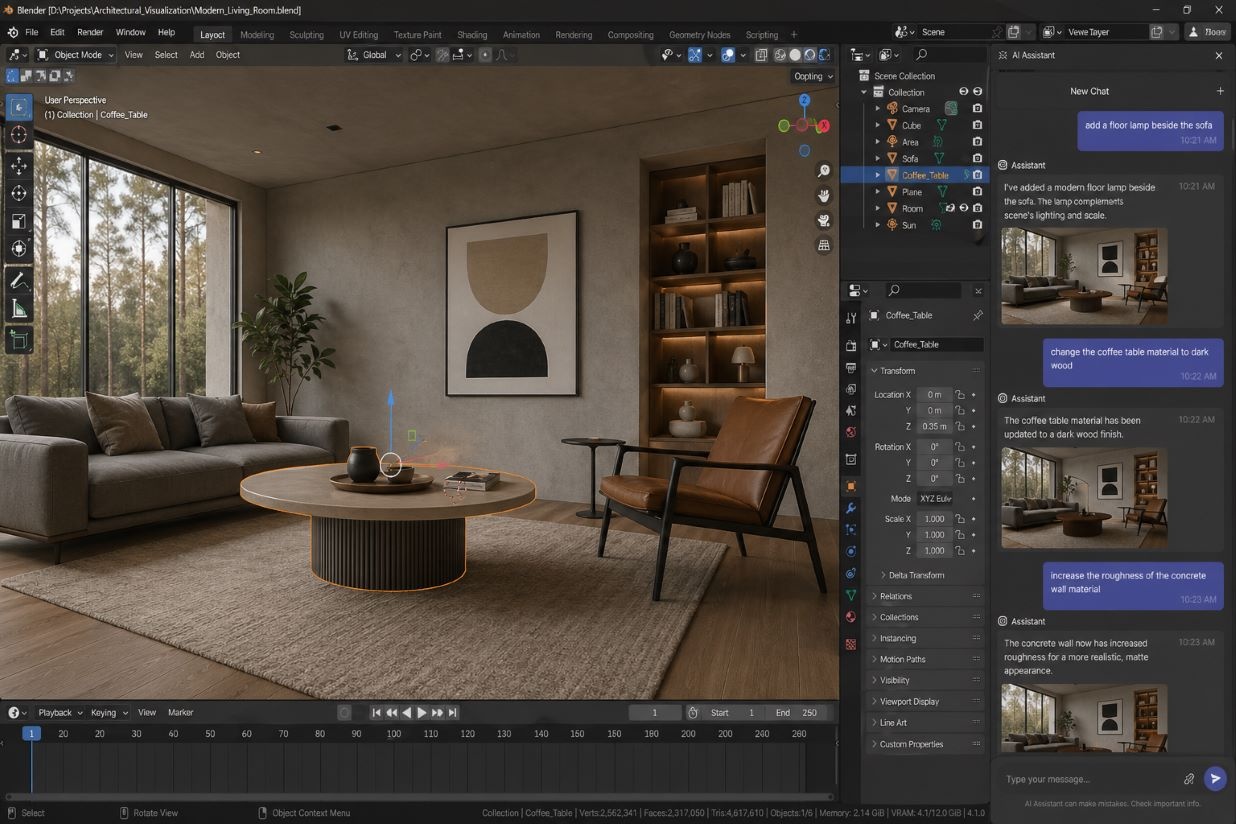
Blender’s integration is arguably the most technically impressive of the eight. Claude gets a natural-language interface for Blender’s Python API, so you describe what you want in plain English and Claude writes and runs the script.
You can analyze and debug scenes, batch-apply changes across multiple objects, and add new tools directly to the Blender interface. Blender built a native MCP connector for this, so Claude tools appear inside the Blender app itself, not in a separate chat window.
For 3D artists who know what they want to build but hate writing Python, this removes a very real barrier.
Autodesk Fusion for 3D modeling
Fusion subscribers can now create and modify 3D models through text conversations with Claude. You describe the model, Claude builds it. You describe the change, Claude makes it.
This targets product designers and engineers who know exactly what they want but spend too much time navigating menus. How well it handles complex parametric designs is something the community will stress-test over the coming weeks, but the concept is sound.
Ableton Live and Push
The Ableton connector works differently from the others. Rather than controlling the software directly, it grounds Claude’s answers in the official product documentation for Ableton Live and Push.
Think of it as having the entire Ableton manual loaded into a chat that actually understands context and follow-up questions. Music producers still learning the software will get the most immediate value. It is a smart reference tool, and that is genuinely useful even if it is not a full controller yet.
Splice sample search
Music producers can ask Claude to search Splice’s catalog of royalty-free samples directly from the chat. You describe the sound you need, and Claude finds candidates from the library.
Anyone who has spent 40 minutes clicking through sample packs hunting for the right snare hit will understand why this matters. The catalog depth of Splice means the results have real range to pull from.
Affinity by Canva
The Affinity connector automates repetitive production work across Affinity’s suite of apps. Tasks like batch image adjustments, layer renaming, and file export are handled by Claude instead of by hand.
It also generates custom features directly inside Affinity apps, not just automates existing ones. For agencies and freelancers processing large volumes of assets, the time savings here could add up quickly across a week of real work.
SketchUp for architecture and interiors
Architects and interior designers can describe a concept to Claude and get a starting 3D model, which then opens directly in SketchUp for further refinement.
Early-stage concepts that used to take an hour to rough out can become a five-minute conversation. The point is not to replace your SketchUp workflow. It is to get a workable starting point before that workflow begins.
Resolume Arena and Wire
This one is niche, but genuinely interesting. Visual artists using Resolume for live performances can now control Arena, Avenue, and Wire in real time using natural language.
VJs and live visual performers can call up effects, trigger layers, and adjust compositions by talking to Claude instead of clicking through panels mid-show. For the people it targets, this changes how a live set actually operates on stage.
How to access these connectors now
All eight connectors are available today. You need a Claude Pro, Max, Team, or Enterprise subscription to use them.
Open claude.ai, go to Settings, and find the Connectors section. Each integration requires a one-time authorization to connect Claude to the relevant app. The full breakdown of capabilities per connector is on the Anthropic blog.
Anthropic is clearly building toward Claude becoming the layer that sits on top of your entire creative stack. The connectors are live, the tools are real, and the Blender and Adobe integrations in particular are deep enough to test seriously. Start with whichever tool you already use the most and see how much of your routine work Claude can actually absorb.